

Showing posts with label poser. Show all posts
Showing posts with label poser. Show all posts
Wednesday, 24 July 2019
Gallery Post - A Public Domain Project

Sunday, 16 September 2018
Towards a Viable Production Time
FURTHER TO MY LAST POST, I wanted to say something about production time, as this is key to the viability of creating images like these for the self and indie publishing market.
 The faux paintings (click the images for a larger view) were created using the method outlined in the tutorial here and from opening Poser (the 3D staging program) to exporting the faux painting from Art Rage (a natural media paint program), each one took just 90 minutes to produce.
This time was achieved largely thanks to preparation. I had a selection of characters already set up in Poser, I knew the content I had ready and had a good idea of what each of the images was going to be before I started. I also got lucky. Frankly, setting up a pose can take that long alone, so I try to use pre-set poses that I modify for my needs – it happens that in this instance, it proved very quick to set up.
Taking the resulting render into my photo editor (Affinity Photo), I used a practised process, starting with some adjustments layers (highlights/shadows, brightness/contrast, and colour balance), then using the Topaz Simplify plug-in. The result was then taken into Art Rage for painting.
Wednesday, 18 July 2018
Cover Tutorial - Underwater
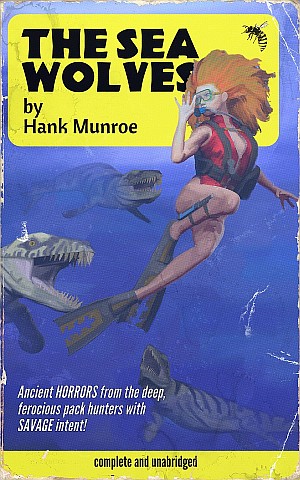
UNDERWATER IMAGES NEED a couple of additional tricks to pull off. I'm going to assume that you've looked at building templates and the First Cover tutorial already and will dive right into this one. 'Deep Sea Thrillers' seem to be very popular these days, if only with the writers, so if you're going to supply for the modern pulp market, this is a genre you should work with.
If you are using 3D staging software like Poser, then fortunately, there are a lot of underwater monsters available to buy a very reasonable prices. You can find fantasy monsters, a giant octopus, creatures direct from Lovecraft's imagination, along with a large assortment of sharks, dolphins, and whales. Even a few fish. Best of all, there are lots of prehistoric beasts, most by a chap who sells under the name of Dinoraul. I shall do some posts featuring his work at some point but really, if you mean to do pulp at all, burn that name into your brain - great prehistoric models, and great fantasy beasts. The creatures in this image are his.
Cover Tutorial - First Cover

FOR OUR FIRST COVER, I think we should keep it very simple. We're going to have a single figure and prop - and that's it. I'm going to assume that you have some working knowledge of the software used, though I'm not going to talk about any very sophisticated functions. I'm also going to assume that you've created the paperback templates as described in my previous post. The programs I'll be using are Poser, Affinity Photo, and Artrage.
For Poser, you could just as easily use DAZ Studio or Carrara. For Affinity, you could use Photoshop, Elements, or GIMP. For Artrage... well, you can use Painter.
Before continuing, I think it worth saying something about why I use a program like Poser to create my source images, rather than using photographic.
Saturday, 14 July 2018
Getting Started with Covers
 FOR MOST OF US, when we think of pulp literature, we think of two things: the covers and the content.
Before we can talk about either, we need to clarify a little what it is that we are talking about. Pulp was a term first applied to the pulp magazines of the early twentieth century, whose covers, on a broader canvas than the paperback, were colourful, lurid, and sensational. These are not my main target here. Instead, I’m interested in their spiritual successor: the cheap pocket paperback. A smaller, narrower canvas created different demands from artists, but because they were selling a single novel (usually) rather than a collection of stories, the on-cover text could be limited and focused.
Like many readers my age and older, I was attracted to the painted paperback of old, they were covers, with their unique aesthetic, full of promises to reader - and that is what sells books. I find many of today’s ePulp covers lacking something, though, in fairness, it is through no fault of their own.
The market for this sort of fiction today is very different from that of the past. Back then, sales would support the cost of professional cover artists, while today’s pulp publishers are working with micro-budgets. To meet the demand for budget covers, there is now a cottage industry in what are being termed ‘pre-made’ covers (or which professionals apparently prefer to term ‘ready for print’). These covers are largely created using stock photos manipulated in a photo editor, such as Photoshop, and feature fairly generic designs so as to maximize the number of books they might be suitable for. It is a scatter-shot strategy, as the designer cannot count on a return from every product, they must keep production costs and time to a minimum, so as to maximize their production output while keeping the price low enough for the customer base. This is why there is such reliance on cheap stock photos and generic designs intended to have a broad appeal, a formula that results in a marketplace of some very competent but frequently either bland and/or samey images.
Subscribe to:
Posts (Atom)